
I have a few things I want to improve on my Flickerbook web page.
- Create a feature that shows holiday dates in a modal.
- Add more charts to totals calculator.
- Write CSS style sheet for print view.
- Add info about YOY charts and new totals calculator charts.
- Create separate websites for total calculator, YOY charts and a site that displays my YTD data.
- Add additional columns to weekly payslips tables to store tax year value in order to use group by statement.
- Add two more columns two weekly payments table: one to store paid break length and another to store paid breaks pay.
- Record and add videos to user guide, main page and info pages.
- Fix second job page. If there is no data to load, it returns an error instead of loading zeros.
- fix YTD modal. In some occasions loads incorrect data.
- If possible explore the possibility to add a button that download payslip as pdf file.
Table to show holiday dates
I currently have a holiday passport that I haven’t filled, and in order to fill it I would need to go through my calendar to find the dates of when holidays where used and what holidays are booked. So this little problem gave me an idea: since I have all the dates already stored in the database, all I need to do is to create a button that activates a function which then makes AJAX request. Then just query the database and retrieve the dates for holidays booked and used and send it back to front end. Once received at front end, activate a modal in which a table would be populated that displays all dates for holidays plus a summary of how many days have been used, booked and left unused. Similar to what I now have for YTD table.
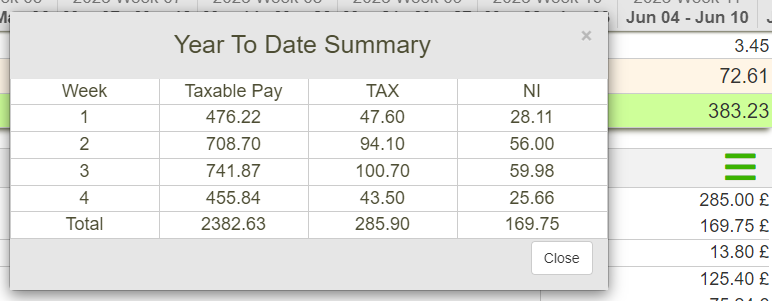
Will also add a “Copy” button which will copy the table and allow me to email it if necessary.
This holiday summary feature would be the first thing I would like to do as it is something I require right now.
Additional charts for totals calculator
It’s been a while since I wanted to have a look at how much I got payed till now by each employer and job positions. And since I have employer names and job positions added to every row for weekly payments table, using an SQL GROUP BY statement I will be able to retrieve this data. I will probably only retrieve gross pay for each employer and job position, as adding other data like net pay, tax, NI, work days or hours would make the table that displays this data cramped with numbers.
The best way to do it would be to add 4 more charts that display data grouped by employer. These charts would display payments, deductions, hours and days worked by employer. Then another 4 charts that display the same data by job position. But I don’t like the idea of having 12 charts on this page, also by using employer name and job position name in the search this type of data (like how many hours you worked at particular employer in a selected job position) can be retrieved already.
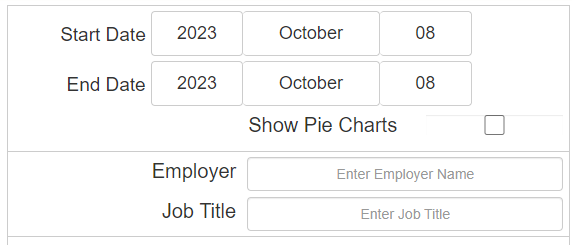
So to improve totals calculator I will only add two charts were one displays gross pat earned by employer and another displays gross pay earned by job position. If in the search field an employer name is entered then the first chart will display that 100% of gross pay was payed by selected employer.
Apart from charts I will add tables as well to display the data. All other tables in this website are created using <div> element, but for this one I want to write a JavaScript function that generates a proper html <table> with <tr> and <td> elements. Will also need to write a PHP script to calculate this tables height at back end as the amount of results might vary and I want to animate the height of the table. Will use JavaScript functions that are already coded for this animation, just need HTML elements with ID attribute’s and height values.
Fixing print view
Currently there is no styling sheet for print view. If an attempt to print a page is made, it prints all the html fixed elements on every page.
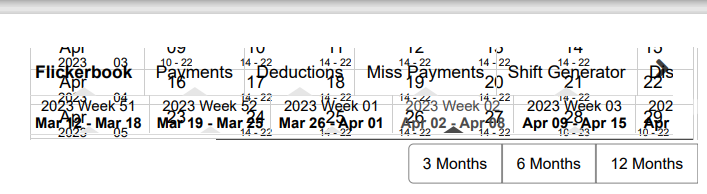
Some elements are not required to be printed, so they should be not displayed on the print layout.
Providing info about the new charts
Once the charts for totals calculator will be done, I will need to add a way for a user to get information about what these charts display and how they work. I already have most of the code for it as I have done similar explanations to main page tables.
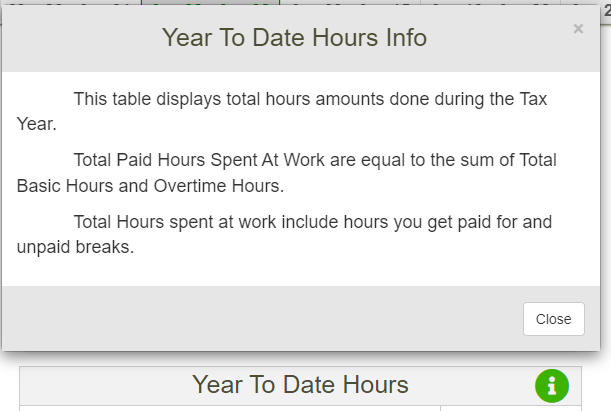
So the main task here will be to write text for every chart that will be stored at back end. Then create HTML elements, that will be activated on a click and will load the text from back end into modal. I will use the already existing JavaScript function to make this AJAX call to back end, but will pass new parameters to it that indicate which button was pressed and which text to fetch from server.
There is also an option for user to hide these info icons, so will need to add these new icon id’s to the function that hides them if a user decides he does not want to see them.
Creating new websites to display data
Once the new charts and info text about them are completed I intend to create 3 websites which will display this data:
- My YTD data.
- Totals calculator.
- YOY charts.
I want to do that as these three websites will act as dynamic dashboards and I will be able to showcase this data to anyone. I intend to use the same back end code and CSS file for each website that is used now, however I will cut out a lot of HTML and JavaScript code and will only leave the code that is necessary for each page to work.
After these websites are created I will add them to my data analysis section on this page.
Additional column for tax year value
Currently there is no value stored in database that would help separate payslips by tax year. This proved to be a problem when I was retrieving data for YOY charts as I can’t group it by tax year. To get around it I had to write a PHP for loop, that iterates the quantity of tax years selected.
for ($x = 0; $x<$taxYearQuantity; $x++){

	//get start year value from taxYearArray
	$taxYearValue = $taxYearArray[$firstTaxYearForLoop];
	$startFinishTaxPeriodArray = fetchFirstAndLastTaxPeriodsForTaxYear($taxYearValue);
        if ($startFinishTaxPeriodArray != NULL ) {
		$taxPeriodStart = $startFinishTaxPeriodArray[0];
		$taxPeriodFinish = $startFinishTaxPeriodArray[1];
      }
      //OTHER CODE IN THE LOOP
      $firstTaxYearForLoop--;
}
In this for loop, first it selects a $taxYearValue from $taxYearArray. $firstTaxYearForLoop is a variable that is equal to quantity of tax years submitted. It is reduced by 1 at the end of every loop: $firstTaxYearForLoop–.
<?php

  $taxYearArray = array("2023/2024","2022/2023","2021/2022","2020/2021", "2019/2020", "2018/2019");
  array_push($taxYearArray,"2017/2018", "2016/2017", "2015/2016", "2014/2015", "2013/2014", "2012/2013", "2011/2012", "2010/2011", "2009/2010");

?>
Second thing done in this loop is calling the fetchFirstAndLastTaxPeriodsForTaxYear function and passing the tax year value selected from the $taxYearArray
function fetchFirstAndLastTaxPeriodsForTaxYear($taxYearValue){
	switch ($taxYearValue) {
		case "2030/2031":
			$firstTaxPeriodOfYear = 1097;
			$lastTaxPeriodOfYear = 1148;
			$taxPeriodQuantityFull = 52;
			break;
		case "2029/2030":
                /////////////OTHER SWITCH STATEMENTS
        $startEndTaxPeriodsArray = array ($firstTaxPeriodOfYear, $lastTaxPeriodOfYear, $taxPeriodQuantityFull);
	return $startEndTaxPeriodsArray;
       }
}
As all payslips stored in this table are numbered, this function returns the number of first and last payslips for the tax period, and once I have these values I can select the sums and averages for each tax year:
        SELECT
	ROUND(COALESCE(SUM(total),0),2) AS totalDeductions,
	ROUND(COALESCE(SUM(net_pay),0),2) AS netPay,
	ROUND(COALESCE(AVG(total),0),2) AS avgTotalDeductions,
	ROUND(COALESCE(AVG(net_pay),0),2) AS avgNetPay,
	ROUND(COALESCE(SUM(pension),0),2) AS pension,
	ROUND(COALESCE(SUM(pensionAmountEmp),0),2) AS pensionAmountEmp
	FROM weekly_deductions_amount WHERE user_id = '$user_id' AND jobID = '$jobID' AND taxPeriodNr >= '$taxPeriodStart' AND taxPeriodNr <= '$taxPeriodFinish'";
I then store these values in PHP arrays that get sent to front end for the charts to be rendered.
This method of gathering averages and sums for tax year is complicated, especially if you compare to how easy a GROUP BY statement would produce the same results. However I will not rewrite this code after I add additional column for tax year value. Even though this work around was difficult, I’m proud I did manage to get around the lack of column by which I could group results. Only while coding this did I realise that this additional column is necessary.
Another thing that will need to go hand in hand with this additional column is a function with a switch statement: a numeric value will be passed to it that indicates the payslip number, and this function will return the tax year value based on that number. Similar to how the switch statement works in the example above. Then this tax year value will be inserted into database table.
For the existing rows, tax year values will need to be entered manually using SQL INSERT statement.
Calculate paid breaks
When coding the YOY chart for hourly rates I mentioned that the highest rate named “Paid Hours Average”, which is calculated by dividing gross pay for tax year by the number of hours spent at work, shows how much my one work hour costs for employer. But I now realise it is incorrect! As I also get paid for at least one break per day, means that on average half an hour a day I get paid to have a break, which in return decreases the amount of hours I spend working. This means that to calculate my hourly cost to employer I have to deduct paid breaks from the sum of hours spent at work. What makes this process complicated is overtimes: depending on overtime hours done, additional breaks will be different in length. Another issue I have is that different employers might have different policies and gathering the data for paid and unpaid breaks might be confusing.
Now when providing payment details for unpaid breaks there is an option to select that all breaks are paid. If this is selected then there is no need for another drop down menu where you could select the number of paid breaks, as this question is already answered. However there is a need to determine the quantity of paid breaks and length of paid breaks if I want to calculate the cost average hourly cost of labour for employer when actually doing labour (I hope that makes sense).
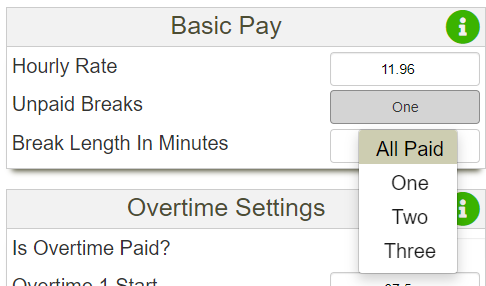
For example if I do regular hours I have one paid break and one unpaid break, but if I do overtime and work 12 hours shift instead of 8, I get additional paid break of half an hour. I can calculate the paid breaks If I know my working hours, but as mentioned earlier, other employers might have different policies and they might choose not to pay for the additional break or give a different length break. I have no intention to write multiple drop down menus in the payment settings page to gather all the possible variations for paid breaks as it would just overcomplicate things, so I will put this idea on hold for now or might even scrap it completely.
Recording videos
I’m thinking of adding videos that display how to use Flickerbook web app. Would use my own smart phone to record them. This would be a lot better then the current user guide and would make the landing page more interactive.
Fixing bugs
There are a few bugs that I need to fix. If a user is trying to load second job page, and there is no data on it in the database, the back end scripts crash and nothing gets loaded. I believe this is caused by the PHP upgrade, as I had similar issues with other scripts as well, and fixed most of them, but this one slipped through.
Another bug I found today is on the YTD summary. If I first load payslip using a load by date button, and then use the horizontal menu to load payslip, if I press to load YTD summary, it does not load correct amount of rows. It loads the summary for the amount of rows that is equal sum of current tax year number and the selected tax year number: for example if the current tax year number is 29, and I load payslip by date, then press on the horizontal menu to load payslip that is payslip 2 for the tax year it will load a total of 31 rows (29+2 = 31). It just seems to add current tax period value for tax year to the row number which it shouldn’t do.
Download payslip as pdf
I would like to add a feature that would allow a user to download a payslip as pdf. While working on CHEP pallets report I did came across some JavaScript libraries that enable to achieve this. I would like to add the hours, payments, deductions and YTD tables to this pdf file.
Even though this would be a useful feature, can already see that I have plenty of work to do on Flickerbook, so this might have to wait till I have spare time for it.