
Had some time so rewrote how YTD summary is created for Flickerbook. The old version is demonstrated in the picture below:
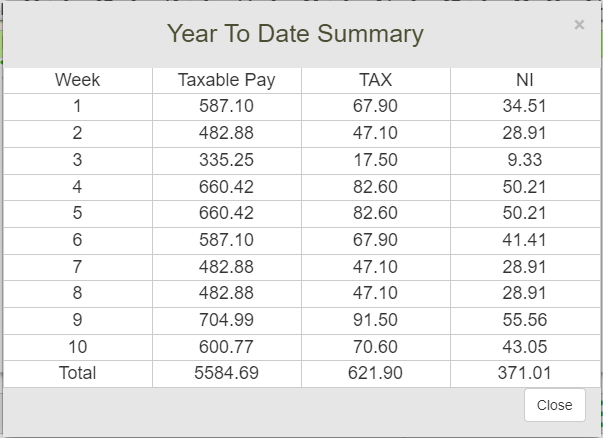
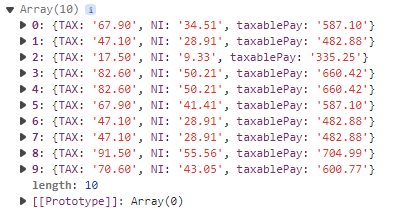
Though it appears like a table, <div> elements are used in it’s creation. Another issue I had with the old version that data is not structured: for four columns a store data in 4 separate arrays. So the first step was to organise data in a proper manner. The results of it is demonstrated in the picture below:
HTML and CSS
Here is a sample of html and CSS code. In HTML the <tbody> tag has an id, which will be used to load YTD data once it’s retrieved from back end.
<div id="YTDErrorReport"></div >
<div class="table-responsive">
	<table class="table" id="YTDModalTable">
		<caption>YTD Taxable Pay, TAX, NI</caption>
		<thead>
			<tr>
				<th class="col-xs-2 TAC BR">Week</th >
				<th class="col-xs-4 TAC BR">Taxable Pay</th >
				<th class="col-xs-3 TAC BR">TAX</th >
				<th class="col-xs-3 TAC">NI</th >
			</tr>
		</thead>
		<tbody id="YTDtbody">
			<class="BT">
                                <td >..loading..</td >
                        </tr>
		</tbody>
		<tfoot>
			<tr>
				<td class="col-xs-2 TAC BR">Total</td >
				<td class="col-xs-4 TAC BR" id="YTDTaxablePayTotal">0.00</td >
				<td class="col-xs-3 TAC BR" id="YTDTaxTotal">0.00</td >
				<td class="col-xs-3 TAC" id="YTDNITotal">0.00</td >
			</tr>
		</tfoot>
	</table>
</div >#YTDtbody > tr > td {
text-align: center;
border-left: 1px solid #cccccc; }
#YTDtbody > tr > td:first-child {
border-left: none; }
#YTDErrorReport + div table thead th {
padding: 0px;
text-align: center;
font-weight: 400;
font-size: 20px;
border-bottom: none; }
#YTDtbody + tfoot {
background-color: #f2f2f2; }JavaScript
loadYTDSummary() function retrieves data from back and, and for each array element in the result array it creates a table row inside tbody and loads the data.
const loadYTDSummary =() => {
	let taxPeriodNumberYTDSummary = taxPeriodNumber + counter;
	let str = 'taxPeriodNumber='+taxPeriodNumberYTDSummary+'&';
	//this one is for error only
	let YTDErrorReport = document.getElementById("YTDErrorReport");
	let YTDTaxablePayTotal = document.getElementById("YTDTaxablePayTotal");
	let YTDTaxTotal = document.getElementById("YTDTaxTotal");
	let YTDNITotal = document.getElementById("YTDNITotal");
	//in case  a table was loaded, ad on second attempt an error occurs, want to clear these values.
	let YTBtbody = document.getElementById("YTDtbody");
	YTBtbody.innerHTML = "";
	YTDTaxablePayTotal.innerHTML = "";
	YTDTaxTotal.innerHTML = "";
	YTDNITotal.innerHTML = "";
	let request;
	if (XMLHttpRequest){
			request = new XMLHttpRequest();
	} else if (ActiveXObject){
		request = new ActiveXObject("Microsoft.XMLHTTP");
	} else {return false;}
	let url = "javascript/ajax/loadYTDSummary.php";
	request.open("POST", url, true);
	request.setRequestHeader("Content-type", "application/x-www-form-urlencoded");
	request.onreadystatechange = function(){
		if (request.readyState == 4 && request.status == 200){
			let response = JSON.parse(this.responseText);
			//errors here are unlikely to happen
			let errorsArrayLength = Object.keys(response.errors).length;
			if (response.sessionIsSet === false){$('#notLoggedInModal').modal('show');notLoggedIn();}
			else {
				//display error at the top of modal body
				if (errorsArrayLength>0){
					for (let i=0; i<errorsArrayLength; i++)
					{
						$("#YTDErrorReport").addClass("errorStyle TAC");
						let errorText = '<br>';
						errorText += response.errors[i];
						errorText += '<br>';
						YTDErrorReport.innerHTML = errorText;
					}
				} else {
					YTDErrorReport.innerHTML = "";
					$("#YTDErrorReport").removeClass("errorStyle TAC");
				}
				//tax week is identical to the array length, but must start the counter from 1 and not 0.
				let taxWeek = 1;
				response.resultArray.forEach(week => {
					//create a tr element
					let tableRow = document.createElement("tr");
					tableRow.setAttribute("class", "BT TAC");
					//create td elements for the row.
					let tableData = document.createElement("td");
					tableData.setAttribute("class", "col-xs-2 TAC BR");
					tableData.textContent = taxWeek;
					tableRow.appendChild(tableData);
					let tableData2 = document.createElement("td");
					tableData2.setAttribute("class", "col-xs-4 TAC BR");
					tableData2.textContent = week['taxablePay'];
					tableRow.appendChild(tableData2);
					let tableData3 = document.createElement("td");
					tableData3.setAttribute("class", "col-xs-3 TAC BR");
					tableData3.textContent = week['TAX'];
					tableRow.appendChild(tableData3);
					let tableData4 = document.createElement("td");
					tableData4.setAttribute("class", "col-xs-3 TAC");
					tableData4.textContent = week['NI'];
					tableRow.appendChild(tableData4);
					//add trow to tbody
					YTBtbody.appendChild(tableRow);
					taxWeek++;
				});

				YTDTaxablePayTotal.innerHTML = response.taxablePaySum;
				YTDTaxTotal.innerHTML = response.taxSum;
				YTDNITotal.innerHTML = response.niSum;
				//Activate copy table button
				document.getElementById("copyYTDTable").onclick = function () {
					copyTable(document.getElementById("YTDModalTable"), document.getElementById("copyYTDResponse"));
				}
			}
		} else if(request.readyState == 4 && request.status == 0 ) {
			notConnectedError();
		} else {}
	}
	request.send(str);
}
PHP and SQL
In this script the first thing I have done is created an empty array for every week with 0 values for tax, national insurance and taxable pay. I have done this in order to send 0 values to front end in case there are no rows in the database for selected week. Later on in this script I change these 0 values to values from database in while loop.
As the resultArray at the beginning of this script is created using week number as it’s key, before sending it to front end I reassign keys starting from 0 using PHP array_values() function. This way it makes it easier to loop trough results at front end.
<?php

$user_id = $_SESSION[ 'user_id' ];

//jobID comes from here
require('includes/selectJobID.php');

//branch tax period number
require_once('includes/taxPeriodNrBranching.php');
$firstTaxPeriodOfYear = tax_period_branching($taxPeriodNumber, $returnValue = true);

//in case no payslips are retrieved from database I still want to send empty values to front end
//in order to do so will need to create a hallow result array first, inside the loop with taxable pay, tax and ni values
//that are all set to 0,
//then once data is retrieved from back end will just update these values accordingly.

$resultArray= array();
for ($i=$firstTaxPeriodOfYear; $i<=$taxPeriodNumber; $i++) {
	$resultArray[$i] = array("TAX"=>"0.00", "NI"=>"0.00", "taxablePay"=>"0.00");
}
//connect to database
require('connectDB.php');
$querySelectYTDData = "
SELECT
	weekly_payments_amount.taxPeriodNr AS taxPeriod,
	SUM(tax) AS taxSum,
	SUM(NI) AS niSum,
	SUM(taxablePay) AS taxablePaySum,
	tax,
	NI,
	taxablePay
FROM weekly_payments_amount
INNER JOIN weekly_deductions_amount
	ON weekly_payments_amount.user_id=weekly_deductions_amount.user_id
	AND weekly_payments_amount.jobID=weekly_deductions_amount.jobID
	AND weekly_payments_amount.taxPeriodNr=weekly_deductions_amount.taxPeriodNr
WHERE

	weekly_payments_amount.user_id = '$user_id'
	AND weekly_payments_amount.taxPeriodNr BETWEEN '$firstTaxPeriodOfYear' AND '$taxPeriodNumber'
	AND weekly_payments_amount.jobID = '$jobID'
GROUP BY
	taxPeriod
ORDER BY
	taxPeriod ASC
	";
$resultSelectYTDData = mysqli_query($weeklyPaymentsDeductions, $querySelectYTDData);
$numJoinQuery = mysqli_num_rows($resultSelectYTDData);

//these value will be calculated by adding them inside the loop to appropriate variable
$taxSum = 0;
$niSum = 0;
$taxablePaySum = 0;
if ($numJoinQuery>0){
	while ($row8 = mysqli_fetch_array($resultSelectYTDData, MYSQLI_ASSOC))
	{
		$resultArray[$row8['taxPeriod']]["TAX"] = $row8['tax'];
		$resultArray[$row8['taxPeriod']]["NI"] = $row8['NI'];
		$resultArray[$row8['taxPeriod']]["taxablePay"] = $row8['taxablePay'];

		$taxSum += ROUND($row8['taxSum'],2);
		$niSum += ROUND($row8['niSum'],2);
		$taxablePaySum += ROUND($row8['taxablePaySum'],2);
	}
}
else{
	//an empty generated array will be sent to front end together with this message.
	$errors[] = "No payslips Found";

}

$loadIndexesArray += array ("taxSum"=>number_format($taxSum,2), "niSum"=>number_format($niSum,2),
"taxablePaySum"=>number_format($taxablePaySum,2),"resultArray"=>array_values($resultArray), "errors"=>$errors);

//close connection
mysqli_close($weeklyPaymentsDeductions);

$jsonFile = json_encode($loadIndexesArray);
echo $jsonFile;
?>
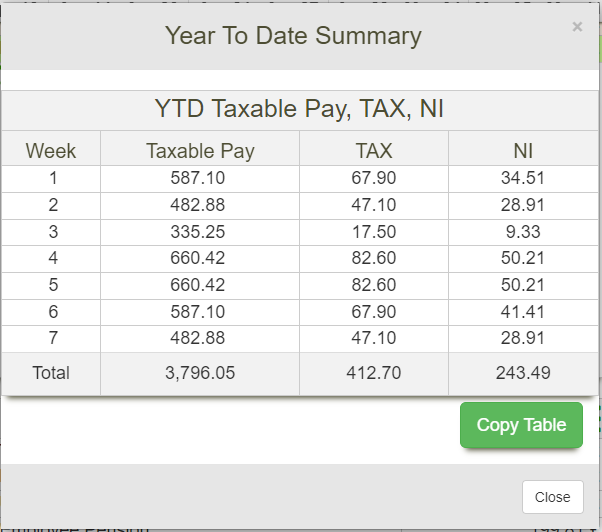
New YTD Summary
Below is and example of the new YTD table. Though it looks practically the same, it is now a lot easier to copy data from this table as it is stored in <table> element.
Done a lot more work than just this, but there is still lot’s of left to do, so probably won’t be posting anything any time soon.